The Meta Conversions API is a server-to-server connection that sends events from your CRM or backend straight to Meta, without relying on the browser. For a med spa, that means reporting what happens after the form fill, such as a booked consult (Schedule) and a paid treatment (Purchase with a value), so Meta learns which leads turn into patients instead of which ones only type in a phone number.
Without that return path, Meta sees a lead from a curious scroller and a lead who pays a deposit the next morning as the same result. Campaign setup itself is covered in our Meta ads guide for aesthetic clinics; this article is only about the data you send back.
Example: assume two ad sets each spend $1,500 in a month. All numbers are assumptions for illustration.
- Ad set A: 60 leads, 9 booked consults. Cost per lead $1,500 / 60 = $25. Cost per booked consult $1,500 / 9 = $166.67.
- Ad set B: 40 leads, 21 booked consults. Cost per lead $1,500 / 40 = $37.50. Cost per booked consult $1,500 / 21 = $71.43.
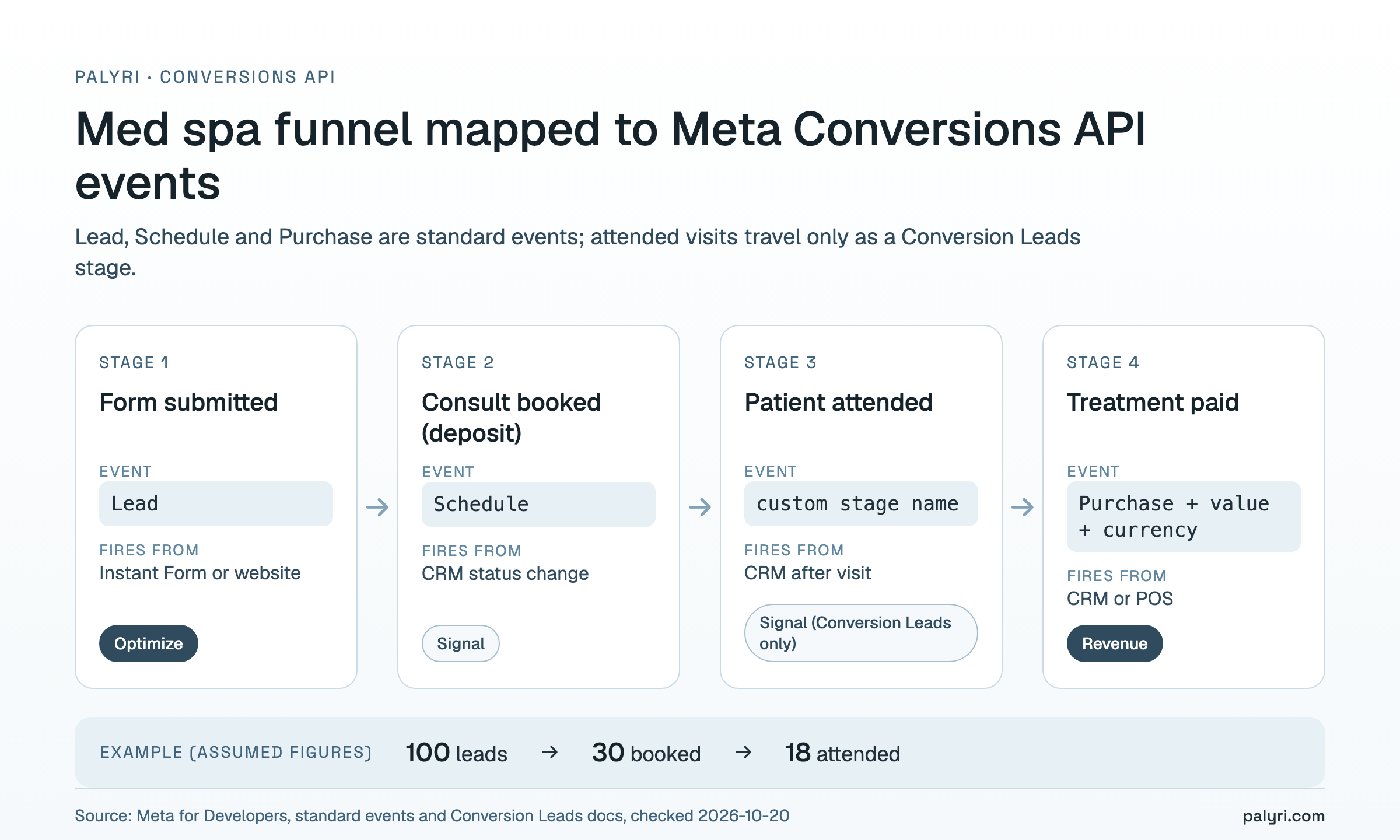
Across both, 100 leads produce 30 booked consults and an assumed 18 attended visits; the 12 booked no-shows look exactly like the 18 who came unless your CRM reports the difference. Judged on leads alone, ad set A wins and gets more budget. Judged on booked consults, ad set B is more than twice as efficient. Meta can only see the second view if you send it. To see how your own lead-to-booking numbers translate into revenue, estimate your ad ROI with your real figures, and compare your lead costs with the ranges in our cost per lead benchmarks for aesthetic clinics.
What is the Meta Conversions API (and how is it different from the pixel)?
The Meta Pixel is a script that runs in the patient's browser. It reports what happens on your website while the page is open: a page view, a form submit, a booking confirmation page. Once the patient closes the tab, the pixel has nothing more to report.
The Conversions API runs on a server. Your CRM, booking system or a middleware tool sends the event to Meta directly, at any time after the click. That difference matters in a med spa because the events that predict revenue rarely happen on your website. The deposit is paid by phone two days later, the consult happens next week, and the treatment is rung up at the front desk.
Meta's CRM documentation asks for uploads at least daily, ideally in real time (Meta for Developers, CRM integration). A browser script cannot do that. Only a server can.
| Question | Meta Pixel | Conversions API |
|---|---|---|
| Where it runs | Patient's browser | Your server, CRM or middleware |
| Sees events after the form fill | Only if they happen on your site while the page is open | Yes, whenever your CRM records them |
| Depends on browser cookies loading | Yes | No, but it can pass the fbp and fbc values you stored |
| Can report a deposit taken by phone | No | Yes |
| Can report treatment revenue from the front desk | No | Yes, as Purchase with a value |
| Avoiding double counting | Sends an eventID | Sends the same event_id and event_name for the same action |
Which med spa events should you send to Meta?
Send every stage your CRM tracks reliably, but optimize for only one. A typical med spa funnel has four stages, and each maps to a Meta event:
| Funnel stage | Meta event | Where it fires | Role |
|---|---|---|---|
| Form submitted | Lead | Instant Form or website funnel | Default optimization event |
| Consult booked (deposit taken) | Schedule | CRM status change | Quality signal; optimization candidate once volume allows |
| Patient attended | Custom stage name | CRM, after the visit | Signal (Conversion Leads path only, see below) |
| Treatment paid | Purchase with value and currency | CRM or POS | Revenue signal for value reporting |
Meta defines Schedule as a standard event for when a person books an appointment to visit one of your locations (Meta Pixel standard events reference). That is a direct match for a booked consult. Define "booked" once and keep it fixed, for example a slot with a deposit rather than a tentative hold.
The attended stage has no standard event. If you run Instant Forms and use Meta's Conversion Leads integration, stage names are free-form, so "consult_attended" can travel as its own event. Outside that path, keep it in the CRM and let Purchase carry the outcome.
Purchase closes the loop. Send it with a value and currency when a treatment is paid, and send another one for each repeat treatment. If your consult-to-treatment step is weak, fix that first; our guide to the consult-to-treatment conversion rate covers the front desk side. The speed and follow-up that decide whether a lead books at all are covered in managing Meta ad leads at your clinic.
Conversions API for CRM vs standard CAPI events: which path fits your lead source?
Meta has two different ways to receive CRM events, and the right one depends on where the lead was captured.
Path 1, Conversion Leads (Instant Forms). Meta states that the Conversion Leads optimization currently supports only native lead ads, meaning Instant Forms on Facebook or Instagram (Meta, Conversion Leads payload specification). Each lead arrives with a Meta lead_id, and you send stage updates keyed to it. The same page sets fixed values: action_source must be system_generated, custom_data.event_source must be crm, and custom_data.lead_event_source names your CRM. Meta also warns that this specification is only for Conversion Leads events and should not be used for anything else.
Path 2, standard events (website or quiz funnel). If patients fill in a form on your own site, there is no lead_id. You send standard events such as Lead, Schedule and Purchase, and Meta matches them with hashed email and phone plus the fbp and fbc values your form stored at submit. When the pixel and your server send the same action, both need the same event name and event ID, and Meta keeps one (Meta, deduplicate pixel and server events).
| Item | Conversion Leads (Instant Forms) | Standard CAPI events (website funnel) |
|---|---|---|
| Lead source | Facebook or Instagram Instant Form | Your website, landing page or quiz |
| Main match key | lead_id, highest priority; an invalid one gets the event rejected | Hashed email and phone, fbp, fbc |
| Event names | Free-form CRM stage names | Standard names: Lead, Schedule, Purchase |
action_source | Always system_generated | The value that matches where the event happened |
| Required custom data | event_source: crm, lead_event_source: <CRM name> | None required; value and currency for revenue |
| What to send | Every stage as it updates, including the raw lead | The events you track reliably |
| What you must capture at form submit | Nothing extra; Meta supplies lead_id | fbp and fbc cookies (or fbclid from the URL) |
What does a booked-consult event payload look like?
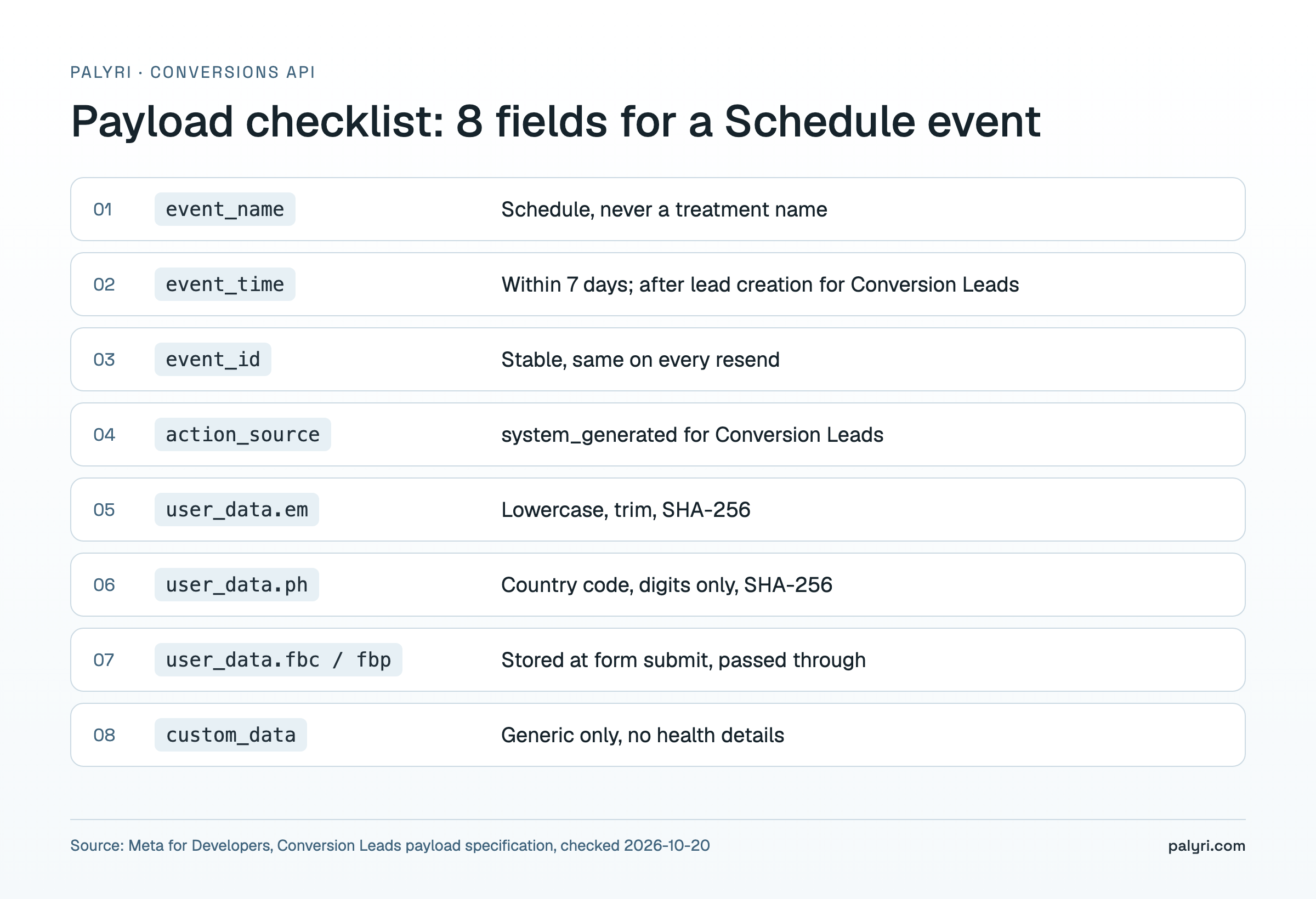
A Schedule event is small. The fields below cover a booked consult from a website funnel; the Conversion Leads variant swaps the matching keys for lead_id and adds the two fixed custom_data values.
| Field | What to put in it | Rule |
|---|---|---|
event_name | Schedule | Standard name, never a treatment name |
event_time | Unix timestamp of the CRM status change | Up to 7 days in the past (Conversion Leads: also after the lead was created) |
event_id | Stable ID, for example lead ID plus event name | Same value on every resend, so Meta counts it once |
action_source | Where the booking happened | Website-funnel events: the source of the booking, e.g. website, phone_call or physical_store (Meta, server event parameters). Conversion Leads events: always system_generated. |
user_data.em | SHA-256 hash of the email | Lowercase and trim before hashing |
user_data.ph | SHA-256 hash of the phone | Digits with country code, no spaces or symbols, then hash |
user_data.fbc / fbp | Values stored when the form was submitted | Pass through unhashed; they tie a later booking to the click |
custom_data | Nothing health-related | Generic only; value and currency belong on Purchase |
For Conversion Leads events, event_time can be up to 7 days before you send the event, and it must fall after the lead generation time (Meta, payload specification), or the event may be discarded (Meta, CRM integration). Standard Conversions API events share the 7-day limit: an older event_time returns an error for the whole request (Meta, server event parameters).
Meta's Conversion Leads spec requires at least one customer information parameter and says email and phone must be hashed; you can also send hashed first name, last name, city, state, zip and more (Meta, payload specification). Normalize before hashing: Meta says to trim spaces and lowercase email, and to strip symbols, letters and leading zeros from phone numbers while keeping the country code (Meta, customer information parameters). A hash of " Jane@Example.com" and a hash of "jane@example.com" never match.
What patient data should you keep out of Meta events?
Send the minimum event data and nothing about treatments or health. The Conversions API carries whatever your CRM sends, so the privacy question is about your payload, not the pipe: every extra field is one more piece of patient information held by an ad platform.
Meta's own rules point the same way. Its Business Tools Terms say advertisers must not send data that includes health, financial or other sensitive categories of information. Health privacy and consumer data laws differ by state and country, which makes event design a question for your healthcare attorney, not your ad agency.
Some healthcare CRM vendors frame safe use as controlling what you send (LeadSquared). That is the right instinct, but hashing alone does not make data anonymous: Meta uses hashed identifiers to match a real person.
lip_filler_consult tied to a hashed phone number tells Meta that a specific person booked a specific treatment. Keep event names, parameters and URLs generic, and get a written review from counsel before you connect patient records to any ad platform.
| Do | Don't |
|---|---|
Use standard names: Lead, Schedule, Purchase | Name events after treatments or conditions |
Use generic stage names such as consult_booked | Use stage names like botox_consult or acne_scar_followup |
Send value and currency only | Send content_name or other custom_data with treatment details |
| Keep landing page URLs neutral when passed as event source | Pass URLs or query parameters that name a treatment or symptom |
| Send only the identifiers needed for matching | Send notes, intake answers or free-text fields |
| Document what each event contains and why | Assume hashing makes data anonymous |
How do you automate sending booked consults to Meta?
There are three practical ways to get CRM events into the Conversions API, and they differ mostly in who maintains the mapping.
- A CRM with native Conversions API support. Status changes fire events without extra tools. Check which events it sends, what triggers them, and whether it stores
fbpandfbcat form submit. - Middleware. A no-code scenario watches CRM status changes and posts events to Meta. Our walkthrough of no-code Make.com lead automation shows the intake side; the return path uses the same building blocks in reverse.
- A custom script. Meta recommends its Business SDK for better error and diagnostic messages, and you need your Pixel ID and an access token for the call (Meta, CRM integration).
Palyri, a CRM for aesthetic clinics, takes the first route. When a lead moves to a deposit status (deposit paid, deposit by transfer or deposit waived), it queues one Schedule event per lead, sent by a background job with retries and a fixed event_id, so resends are deduplicated. Lead stays the optimization event and Schedule goes alongside as a quality signal; Palyri does not change your campaign objective. It stores fbp and fbc at funnel form submit and replays them with later events, hashes identifiers with SHA-256, and sends Purchase with a value when a visit gets a treatment value, including repeat treatments. Note that its booking trigger is the deposit status, not attendance, and there is no separate show-up event. Plans are listed on the Palyri pricing page.
For Meta's Conversion Leads integration, the documented limits are:
Sources, all for Conversion Leads: 7-day window from the Conversion Leads payload specification; 1-hour visibility and daily upload from Meta's CRM integration guide.
How do you check that your CAPI events are working?
Test before you trust the numbers. Meta says events should start appearing in Events Manager for your Pixel within an hour once your integration is uploading, and that Conversion Leads events need a valid lead_id to appear (Meta, CRM integration).
Schedule event reaches the Test Events tool in Events Manager.2. Wait up to an hour and confirm the event shows in the main Events Manager view for the right Pixel.
3. For Instant Form leads, confirm that
lead_id is valid, event_source is crm, and lead_event_source names your CRM.4. Check that
event_time is the status change time, not the send time, and is less than 7 days old.5. Resend the same event and confirm it is counted once, which proves your
event_id is stable.6. Confirm events from the pixel and the server for the same action share one
event_id and the same event_name.7. Review Event Match Quality, Meta's 0 to 10 score for how confidently an event maps to a real user (Stackmatix), and add hashed fields if it is low.
8. Open the raw payload and confirm no event name, parameter or URL contains a treatment, condition or note.
9. Set an alert for failed sends, so a broken token does not silently stop the return path for a week.
Repeat steps 1, 4 and 8 whenever someone adds a new CRM stage or renames one.
FAQ
Do I still need the Meta Pixel if I use the Conversions API?
Yes, for most med spas. The pixel reports what happens on your website while the page is open, such as page views and form submits, and it sets the fbp and fbc cookies that later help match server events to the ad click. The Conversions API reports what happens in your CRM afterward: deposits, booked consults and paid treatments. When the same action is sent from both, give both copies the same event name and event_id so Meta counts it once instead of twice.
What happened to Meta's Offline Conversions API?
Meta now routes offline events through the Conversions API rather than a separate offline product. Vendors that integrate with Meta describe the old Offline Conversions API as phased out, with booked appointments and other offline events sent through CAPI instead (LeadSquared).
How long until CRM events show up in Events Manager?
Meta says you should start seeing events in Events Manager for your Pixel within an hour once your integration is uploading them (Meta, CRM integration). If nothing shows after an hour, check the access token, the Pixel ID, the lead_id for Instant Form leads, and the event_time limits above.
Should I optimize campaigns for booked consults instead of leads?
It depends on volume. Meta needs enough conversions of the chosen event to learn from, and booked consults are always fewer than leads. While booked volume is low, a common setup is to keep Lead as the optimization event and send Schedule alongside as a quality signal, then revisit the choice once bookings are steady. Meta's own lead-quality option, Conversion Leads, works only with Instant Forms (Meta, payload specification). Change one variable at a time and judge the switch on cost per booked consult, not cost per lead.
Can I send treatment revenue to Meta?
Yes. Send a Purchase event with value and currency when a treatment is paid, and send another for each repeat treatment, each with its own stable event_id. Do not add the treatment name, body area or any note in content_name, custom_data or a URL; with hashed identifiers, that tells Meta what a specific patient had done.
Does hashing make patient data safe to send?
Not by itself. Meta asks for SHA-256 hashed email and phone so it can match an event to a real account, which means the hash still points to one person. What keeps an event low-risk is its content: a standard event name, no treatment or condition, no notes. Keep treatment and health details out of every event, check the sensitive-data section of Meta's Business Tools Terms, and have counsel review your event design.
Want to implement this in your clinic?
Book a free Palyri demo. We'll show how it works on your clinic's data.
Book a demoPalyri blog author
Writes for the Palyri blog about getting clients from ads, handling leads and front-desk work in aesthetic clinics and beauty salons.