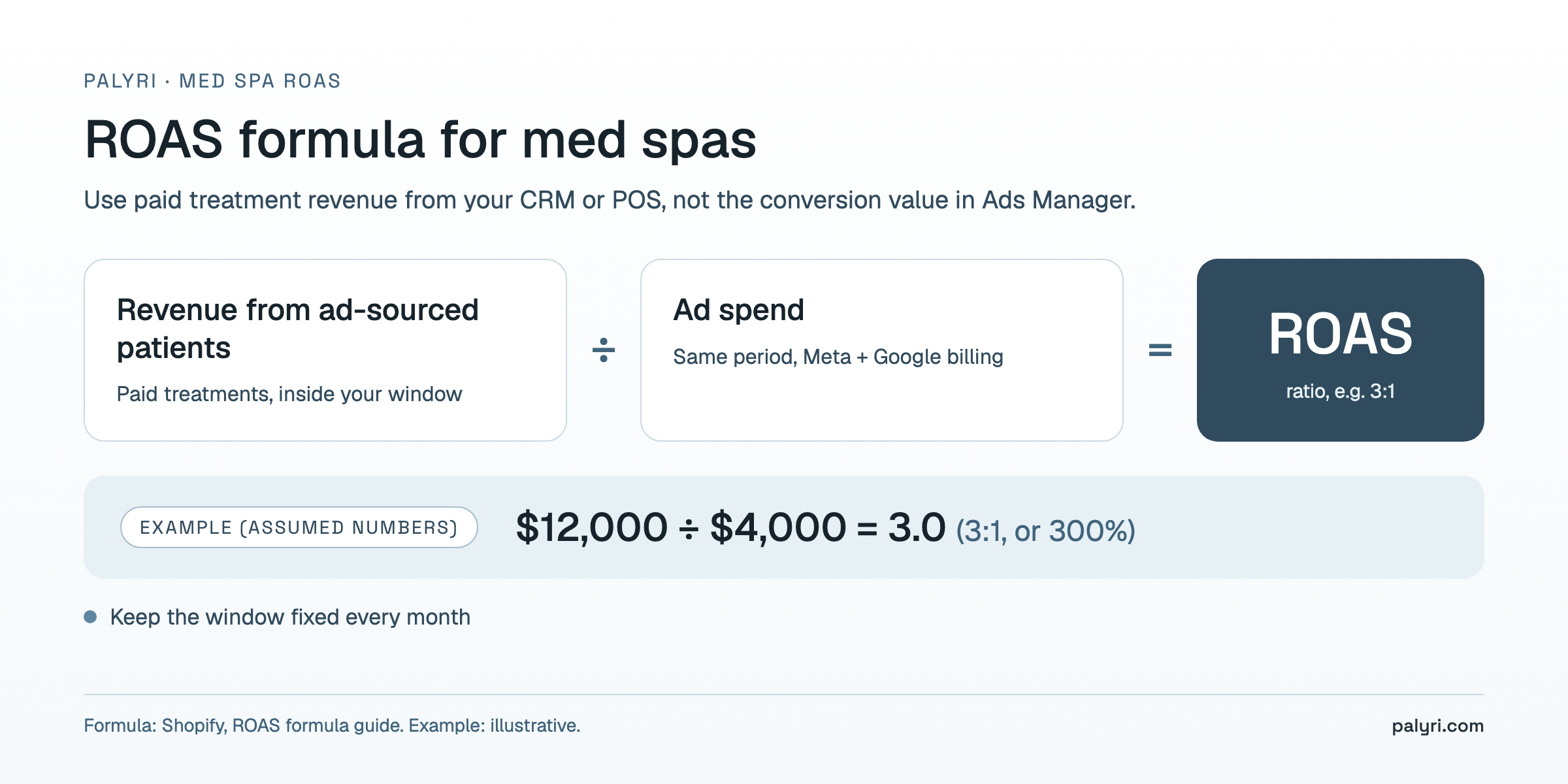
Med spa ROAS is the revenue from treatments actually paid for by patients who came from an ad, divided by the ad spend for the same period, written as a ratio: 3:1 means $3 of revenue for every $1 of ads. Use the revenue recorded in your CRM or POS for ad-sourced patients, counted inside a window you choose and keep fixed, not the conversion value Ads Manager shows you.
Example: you spent $4,000 on Meta and Google ads in October, and the patients from those October leads paid $12,000 for treatments within 60 days of becoming a lead. Your ROAS is $12,000 ÷ $4,000 = 3.0, or 3:1. The numbers are assumptions for illustration; the method is what matters.
The formula is standard (Shopify defines it as "Revenue from ads / Ad spend"). The hard part for a med spa is which revenue counts, how long you wait, and why Meta and Google never agree with your books.
What is med spa ROAS and how do you calculate it?
ROAS (return on ad spend) answers one question: for every dollar you put into ads, how many dollars of revenue came back? For a med spa, the honest version of the formula is:
ROAS = revenue from ad-sourced patients (inside your window) ÷ ad spend (same period)
Three inputs have to line up for the number to mean anything:
- Ad spend: what you paid Meta, Google and any other paid channel for the period, taken from the billing screen, not an estimate. If an agency runs the ads, keep the management fee out of ROAS and put it into ROI instead.
- Ad-sourced patients: leads whose source in your CRM is a paid campaign, created during the same period as the spend. A patient who booked by phone after seeing an Instagram ad only counts if the front desk recorded the source.
- Revenue inside the window: what those patients paid within a fixed number of days after they became a lead. The window is your rule, and it stays the same every month.
Ratio and percent are the same number written two ways. A ROAS of 3.0 is 3:1, or 300%. Shopify's own worked example is "$20,000 / $4,000 = 5", which it reads as "5:1" (Shopify). Pick one format and use it everywhere.
The big difference from ecommerce is timing. In a web store the purchase happens minutes after the click. In a med spa, a lead becomes a consult, the consult becomes a treatment plan, and the paid treatment can land weeks later. That delay drives most of the decisions in the rest of this guide.
Which revenue should count: deposit, booked consult or paid treatment?
A med spa has at least four candidate "revenue" numbers for the same lead, and each tells you something different.
| Revenue definition | What it measures | When to use it | Bias |
|---|---|---|---|
| Deposit collected | Money taken to hold a consult or treatment slot | Early signal, days after the lead | Understates: the deposit is a fraction of the treatment price |
| Booked consult value | Price of the treatment the patient booked or was quoted | Weekly pacing while the cohort matures | Overstates: no-shows, cancellations and patients who decline are still counted |
| Paid treatment (completed) | Money actually collected for treatments delivered | Your "true" ROAS, the number you make budget decisions on | Closest to reality, but only after the window has passed |
| Revenue per patient over 90+ days | Paid treatments plus repeat visits, packages and memberships | Long-term view of a channel's value | Can flatter a channel when repeat visits would have happened anyway |
The practical setup is two numbers. Report paid-treatment ROAS as the headline, because it is money in the bank. Track booked value or deposits as a leading indicator so you are not flying blind for the first few weeks of a campaign.
The gap between booked and paid is your consult conversion. If booked ROAS looks strong but paid ROAS keeps coming in low, the problem may sit in the consult room rather than in the ads. Our guide to consultation to treatment conversion covers how to measure and fix that step.
Two rules keep the revenue column clean. Subtract refunds and chargebacks in the month they happen. Leave out gift card sales until the card is redeemed for a treatment, otherwise you count the same dollars twice.
What is a break-even ROAS for a med spa?
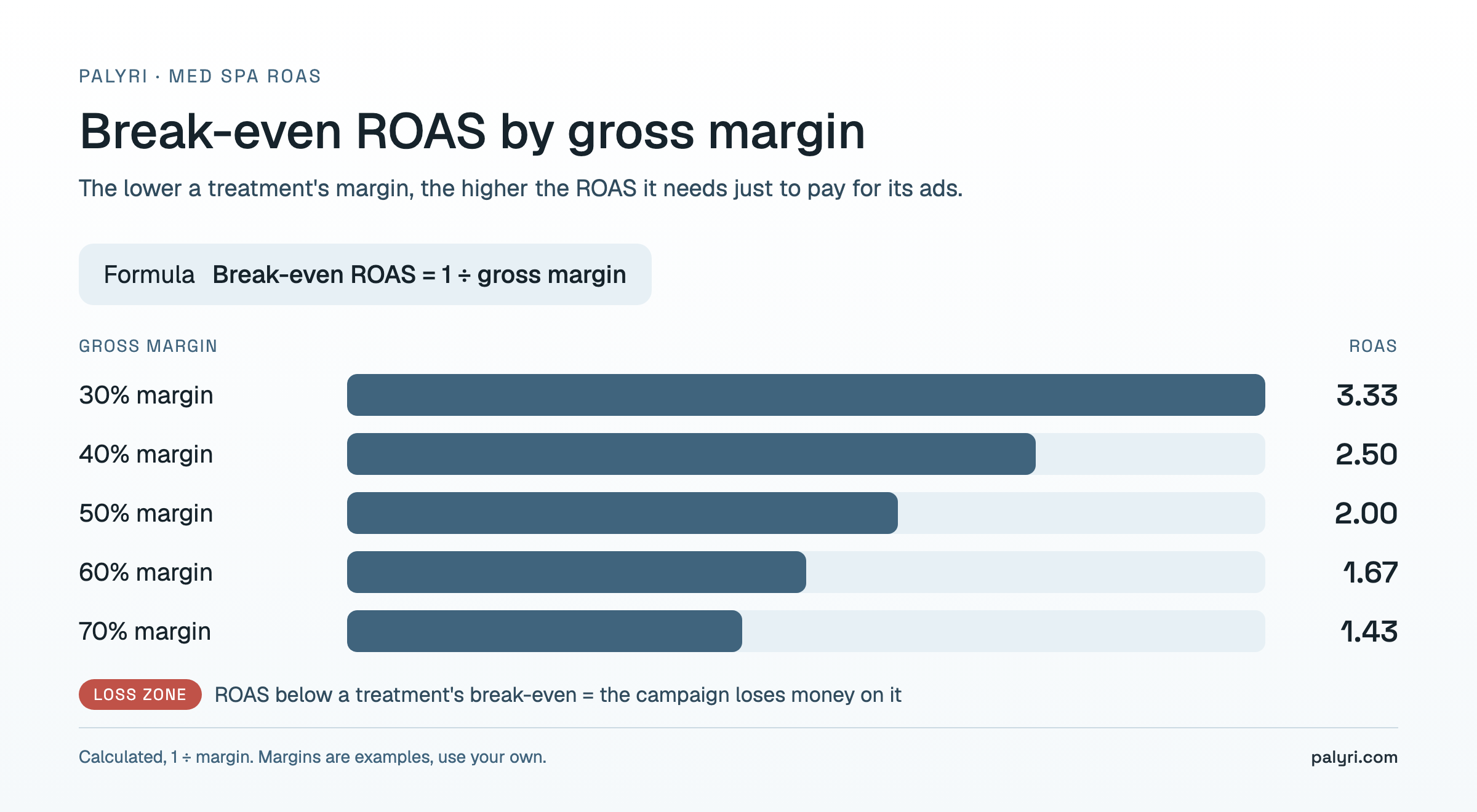
Break-even ROAS is the ROAS at which an ad campaign pays for itself and nothing more. The formula uses the gross margin of what you sell:
Break-even ROAS = 1 ÷ gross margin
Gross margin here means treatment price minus the direct cost of delivering it (product such as toxin or filler, consumables, and provider pay per treatment), divided by the price. At break-even, every dollar of gross profit goes back into ads.
Example: a treatment sells for $1,000, and product plus provider pay costs $400 (an assumption, use your own numbers). Gross margin is 60%. Break-even ROAS = 1 ÷ 0.60 = 1.67. Any campaign below 1.67:1 loses money on that treatment, even though Ads Manager may show a "positive" return.
Second example: a treatment with a 30% margin, because product cost is high relative to price. Break-even ROAS = 1 ÷ 0.30 = 3.33. The same 2.5:1 ROAS that is profitable for the first treatment loses money on this one.
This is why a single "good ROAS for med spas" number is not useful. Published averages circulate without methodology, and they mix treatments with very different margins. Work out your own break-even per treatment category, then judge campaigns against it. If you want the full profit picture after rent, front desk and software, plug your numbers into the ROI calculator for aesthetic clinics.
Which attribution window should a med spa use for ROAS?
An attribution window is the number of days after an ad interaction during which a conversion still gets credited to that ad. Ad platforms and your CRM each apply one, and they rarely match.
On Google, "a 30-day default window will be applied to your conversions," and "you can set the conversion window anywhere from 1 to 90 days, depending on the source of conversions" (Google Ads Help). A conversion that happens after the window "won't be recorded. This means it won't appear in your reports" (same source).
Meta credits only conversions that happen inside the attribution setting of the ad set, which combines a click window and, optionally, a view window. Check the setting shown in Ads Manager for each ad set before you compare its numbers with your CRM (Meta attribution documentation).
The med spa problem is delay. The American Med Spa Association notes that "bookings from Meta Ads often happen with a delay. A user may see your ad, engage with your content, visit your profile, and only decide to book days or weeks later" (AmSpa). A short platform window misses those patients; a long one credits patients the ad barely touched.
Cohort maturity is the second half of the rule. Leads that arrived last week have not had 60 days to book, show and pay, so their ROAS will always look low. Judge a month's ROAS only once its whole cohort has had the full window. Until then, report it as "in progress" and look at booked value instead.
Why Ads Manager ROAS doesn't match your CRM revenue
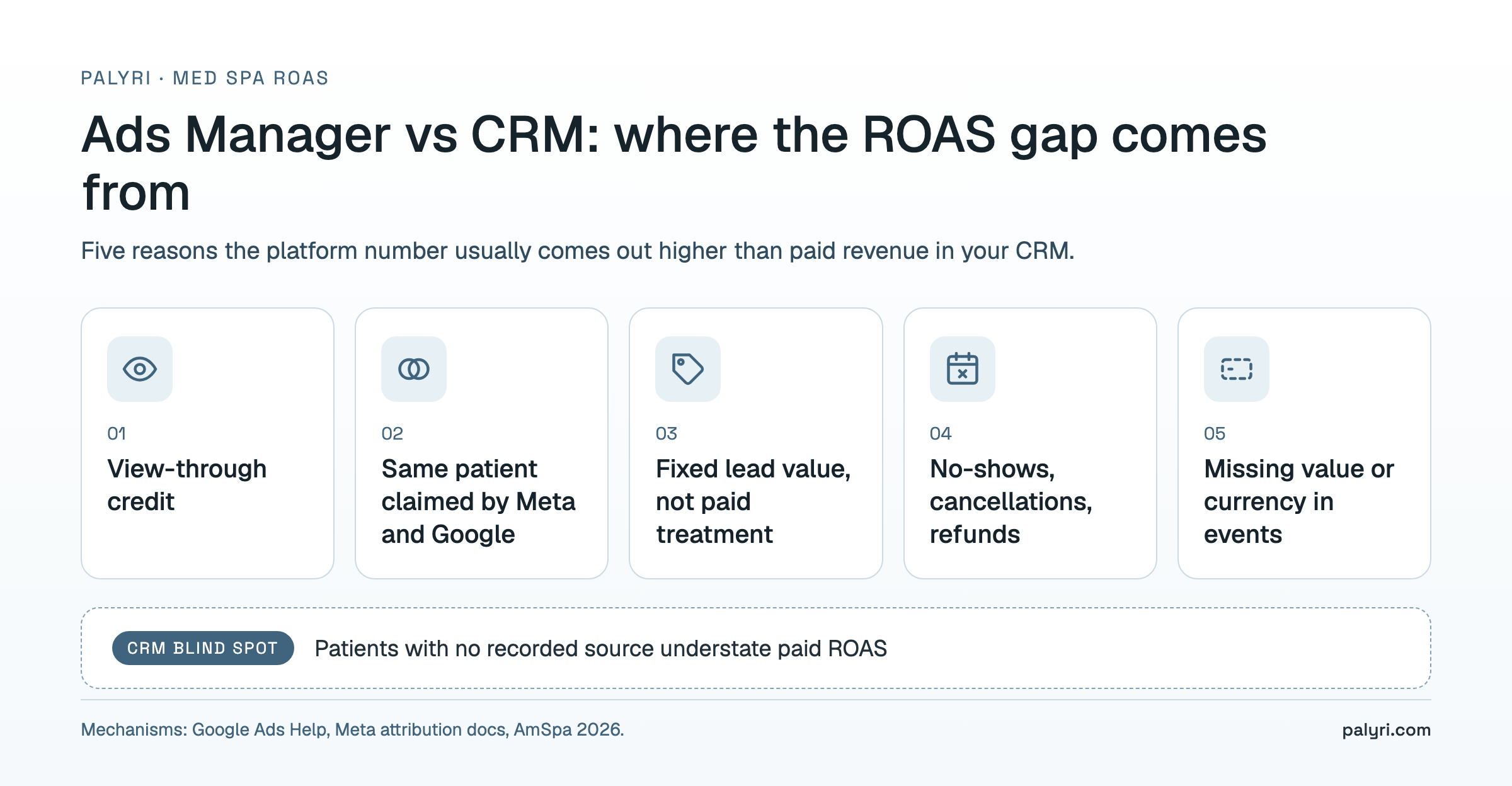
Almost every med spa that compares the two sees the platform number come out higher. Five mechanisms explain most of the gap.
- View-through credit. If the ad set's attribution setting includes a view window, Meta can credit a conversion to someone who saw the ad without clicking. Your CRM has no record of that view, so it attributes the patient to whatever source the front desk recorded.
- Double counting across platforms. AmSpa describes the typical path: "A patient might first encounter your clinic on Instagram, then search for your services on Google days later, and finally book after comparing a few options. Both platforms contribute to that outcome" (AmSpa). Meta and Google can each claim that same patient. Add their reported revenue together and you count one treatment twice.
- Lead value instead of paid value. Many accounts assign a fixed value to every lead or booking event. The platform then reports "revenue" for leads that never show, never pay, or buy something cheaper than the assumed value.
- No-shows, cancellations and refunds. The platform records the conversion when the event fires. It does not learn that the consult was a no-show or the treatment was refunded unless you send that back.
- Missing or wrong values in events. If events reach the platform without a value, or with the wrong currency, the ROAS column is either empty or distorted.
The CRM has its own blind spot: patients whose source was never recorded. A front desk that types "walk-in" for someone who saw three Instagram ads understates paid ROAS. That is why the reconciliation below tracks both numbers rather than trusting one.
How to send booked revenue back to Meta and Google
The platforms can only optimize toward revenue they can see. If you want Meta and Google to report something closer to your CRM, send them the real outcome.
On Meta, the Conversions API accepts a value and a currency with each event. Meta's documentation says value is "required for purchase events or any events that utilize value optimization" and must "represent a monetary amount," and currency is "required for purchase events" (Meta for Developers). Without those two fields, revenue never reaches Meta's ROAS column. Our walkthrough on how to send booked consults to Meta with the Conversions API covers the event setup.
On Google, offline conversion import lets you upload outcomes that happen outside the website, such as a completed treatment, tied back to the original ad click. It relies on an "Import from Clicks" conversion action and auto-tagging, which adds the click ID (GCLID) to the landing page URL (Google Ads Help, offline conversions). Google has also announced that offline conversion imports move to its Data Manager API starting June 15, 2026 (Google Ads Help), so check which method your setup uses.
| Platform | What you send | Required pieces |
|---|---|---|
| Meta | Server event for the booking or paid treatment | Event name, value, currency (USD), customer match data |
| Offline conversion for the paid treatment | "Import from Clicks" conversion action, GCLID captured at the lead, conversion time, value |
Monthly med spa ROAS reconciliation worksheet (template)
This worksheet puts CRM revenue and platform-reported revenue side by side for one cohort month. Fill it once a month, for the month whose window has just closed. The figures below are an Example with assumed numbers, so you can follow the arithmetic before entering your own.
Example assumptions: October cohort, 60-day CRM window, Meta and Google only, average paid treatment $500.
| Row | Source | Example value | How it is calculated |
|---|---|---|---|
| 1. Ad spend, Meta | Meta billing | $3,000 | From the invoice for the month |
| 2. Ad spend, Google | Google billing | $1,000 | From the invoice for the month |
| 3. Total ad spend | Rows 1 + 2 | $4,000 | $3,000 + $1,000 |
| 4. New ad-sourced leads | CRM | 120 | Leads created in October with a paid source |
| 5. Booked consults | CRM | 48 | From row 4 leads |
| 6. Showed | CRM | 36 | Visits with a recorded "showed" outcome |
| 7. Paid treatments | CRM or POS | 24 | Paid within 60 days of the lead date |
| 8. Revenue (CRM, 60-day window) | CRM or POS | $12,000 | 24 × $500, minus refunds |
| 9. CRM ROAS | Row 8 ÷ row 3 | 3.0 | $12,000 ÷ $4,000 |
| 10. Platform-reported revenue | Meta + Google | $16,000 | $11,000 (Meta) + $5,000 (Google) |
| 11. Platform-reported ROAS | Row 10 ÷ row 3 | 4.0 | $16,000 ÷ $4,000 |
| 12. Gap | (Row 10 − row 8) ÷ row 8 | 33% | ($16,000 − $12,000) ÷ $12,000 |
Example, continued: with an assumed blended margin of 50%, break-even ROAS is 1 ÷ 0.50 = 2.0, so a CRM ROAS of 3.0 means the October ads were profitable at the treatment level. The 33% gap tells you how much to discount platform numbers when you check campaigns mid-month.
The 5-step monthly checklist:
- Close the cohort. Pick the lead month whose CRM window ended this week, and only that month.
- Pull spend from billing. Use invoiced amounts for Meta and Google, not the estimates in a dashboard.
- Clean the CRM before you count. Fill missing lead sources, record every show or no-show outcome, and subtract refunds. Missing outcomes make paid ROAS look worse than it is.
- Record both ROAS numbers and the gap. Write rows 9, 11 and 12 into a running sheet so you can see whether the gap is stable.
- Decide per campaign against break-even. Shift budget toward campaigns above break-even after the window, cut those below it, and leave campaigns with an immature cohort alone.
A CRM can do much of this arithmetic for you if it ties every lead to its ad and its visit. In Palyri, the statistics screen includes an ad creative performance table that shows spend, leads, visits, CRM revenue and ROAS per creative. It holds back a verdict until leads are at least 14 days old, and it flags creatives that get clicks but no leads, which usually means broken tracking. See how this fits into the CRM for med spas and aesthetic clinics, or check Palyri pricing.
Budget sizing is a separate decision. For how much to spend in the first place, use the 90-day med spa marketing plan, and for what each channel typically costs, see med spa advertising channels and costs.
FAQ
What is a good ROAS for a med spa?
A good ROAS is one above your break-even ROAS, measured after the attribution window has fully passed. Break-even ROAS equals 1 divided by the gross margin of the treatments you sell, so a 50% margin gives a break-even of 2.0 and a 30% margin gives 3.33. That is why one industry-wide number does not help: the same ROAS can be profitable for one treatment and a loss for another. Calculate break-even per treatment category, then compare each campaign's paid-treatment ROAS against it. For the cost side of the equation, see our cost per lead benchmarks for aesthetic clinics.
Is ROAS the same as ROI?
No. ROAS is revenue divided by ad spend and ignores every other cost. ROI subtracts the full cost of delivering the result: product, provider pay, consumables, agency fees, software and front desk time, then compares the profit with what you invested. A campaign can show a 2:1 ROAS and still have a negative ROI if treatment costs eat the margin. Use ROAS to compare campaigns and channels quickly, and ROI to decide whether marketing as a whole is making the practice money. The ROI calculator for aesthetic clinics runs the full version with your own costs.
Should med spa ROAS include repeat visits and memberships?
Report two views instead of mixing them. The first is window ROAS: paid treatments within your fixed window, such as 60 days after the lead. That is the number you use to judge and adjust campaigns month to month. The second is a longer view, for example 90 or 180 days per patient, which includes repeat visits, packages and memberships. That view shows the real value of a channel but arrives too late to steer this month's budget. Keep the two in separate columns so nobody compares a 60-day number with a 180-day one. Our guide to membership programs and recurring revenue covers the long-term side.
Why is my Facebook ROAS higher than my real revenue?
Usually for three reasons. First, view-through credit: if the ad set's attribution setting includes a view window, Meta can count patients who saw an ad without clicking it. Second, double counting: a patient who saw your Instagram ad and later clicked a Google ad can be claimed by both platforms, as AmSpa describes. Third, value: if your events send a fixed lead value or a booking value, Meta reports revenue for no-shows and cancellations that never paid. Compare the platform figure with paid-treatment revenue in your CRM for the same cohort, and track the gap each month instead of trying to make it zero.
How long should I wait before judging a new campaign's ROAS?
Wait until the leads in the cohort have had your full CRM window to book, show and pay. If your rule is "revenue paid within 60 days of the lead," a campaign that started this week cannot produce a final ROAS for about two months. In the meantime, watch earlier signals: lead volume, booked consults and booked value per dollar of spend. They tell you whether the campaign is on track without forcing a verdict on an immature cohort.
Want to implement this in your clinic?
Book a free Palyri demo. We'll show how it works on your clinic's data.
Book a demoPalyri blog author
Writes for the Palyri blog about getting clients from ads, handling leads and front-desk work in aesthetic clinics and beauty salons.