The right aesthetic clinic software for a UK aesthetics clinic is the one that covers online booking with deposits, consent and treatment records with photos, prescriber and batch records, UK GDPR terms (a signed data processing agreement under Article 28, a known hosting location, a usable export) and CQC record-keeping if you are registered, at a total monthly cost you have checked in GBP plus VAT. Prices published on vendor pages, as listed on 2026-11-07, range from £25 + VAT per month (Aesthetic Nurse Software Foundation, 1 bookable practitioner) to quote-only (Phorest, and Pabau beyond the Solo price shown for your region).
Below, each UK obligation is mapped to the feature that supports it, with the primary source linked, and the full 40-point checklist sits at the end. This is not legal advice.
What should aesthetic clinic software do for a UK aesthetics clinic?
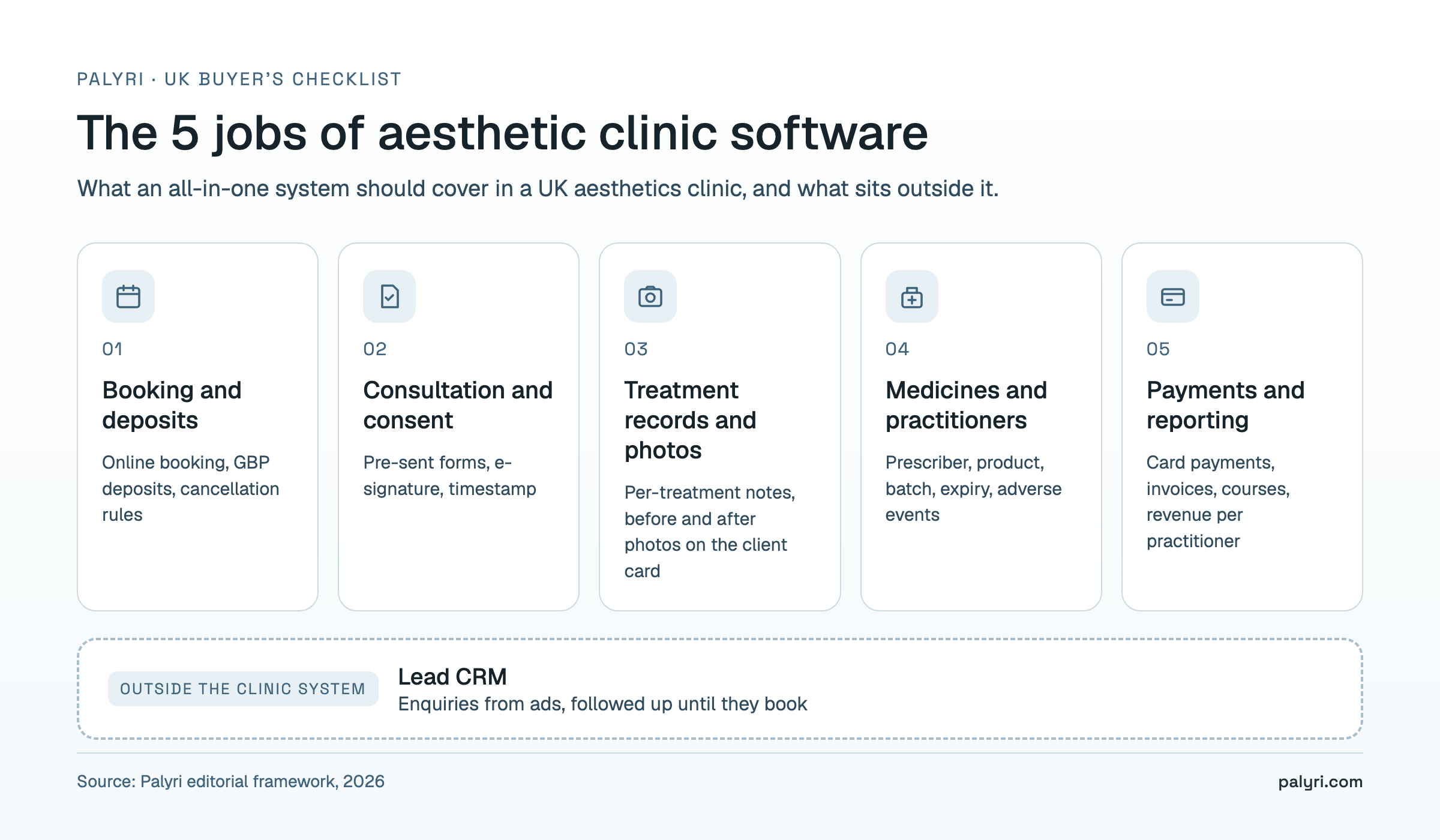
Aesthetic clinic software has five jobs. Any job a product skips ends up on paper or in a second tool, so price that gap in.
- Booking and deposits. An aesthetics booking system clients use from your website and social profiles, with GBP deposits and an enforced cancellation policy.
- Consultation and consent. Medical history, consent and aftercare forms, e-signed and timestamped.
- Treatment records and photos. A record per treatment, with photos on the client card, not a phone.
- Medicines and practitioner records. Prescriber, product, batch and expiry, plus adverse event follow-up.
- Payments and reporting. Card payments, invoices, courses and revenue reports.
Lead handling (enquiries from ads before anyone books) usually sits outside this list; it is a CRM job, covered below.
Aesthetics booking system checklist: bookings, deposits and no-shows
Most booking demos look the same. Test the parts that cost money when they fail.
- Where clients book. As listed on 2026-11-07, Aesthetic Nurse Software, for example, states that clinics can take bookings 24/7 from Facebook, Instagram and a website. Phorest lists a Reserve with Google integration and a branded booking app on its Ultimate plan (as listed on 2026-11-07). Check what your plan includes.
- Deposits in GBP. Ask whether deposits can be fixed or a percentage, and set per treatment or only for new clients.
- Cancellation policy enforcement. The policy should show before payment and apply automatically.
- Reminders. SMS and email with confirm or cancel. Ask what each SMS costs.
- Practitioners and rooms. Shared rooms and lasers must be blocked, not only people.
If no-shows are already a problem, read our guide to cutting no-shows in an aesthetics clinic before you set the deposit rules, and the step-by-step online booking set-up once you have chosen a system.
Consent forms, treatment records and photos: what to check
Consent and records separate aesthetic clinic software from salon software: a signed, versioned consent form tied to one treatment and one batch of product.
What vendors list on their own pages, as listed on 2026-11-07:
- Aesthetic Nurse Software says its medical, consent and aftercare forms can be sent before the appointment or completed in clinic, and that before and after photos can be secured with comparison tools.
- Phorest lists pre-sent digital consultation forms, forms sent at time of booking and PIN authentication for consultations on its Grow plan, with an add-on for HD photos, side-by-side comparisons and face mapping stored on the client card.
- Clinicea describes "Casesheets" that digitise paper intake and consent forms into a customisable EMR.
- Pabau states that every plan includes clinical records and forms.
The table separates what you need on day one from what is useful later.
| Record feature | Must-have | Nice-to-have |
|---|---|---|
| Consent form sent before the appointment | Yes | |
| E-signature with timestamp and audit trail | Yes | |
| Version control of consent templates | Yes | |
| Treatment notes per visit | Yes | |
| Before and after photos on the client card | Yes | |
| Photo consent recorded separately | Yes | |
| Batch or lot and expiry per treatment | Yes (for medicines and fillers) | |
| Face mapping and injection charts | Yes |
UK GDPR and the ICO: data questions to ask every vendor
Treatment records and clinical photos are health data, which UK GDPR Article 9 treats as special category data with extra conditions for processing. Your clinic is the controller. The software vendor processes that data on your behalf, so you need a written contract containing the terms set out in Article 28, usually called a data processing agreement (DPA).
The ICO's UK GDPR guidance explains these duties, and the ICO data protection fee is your clinic's duty, not the vendor's.
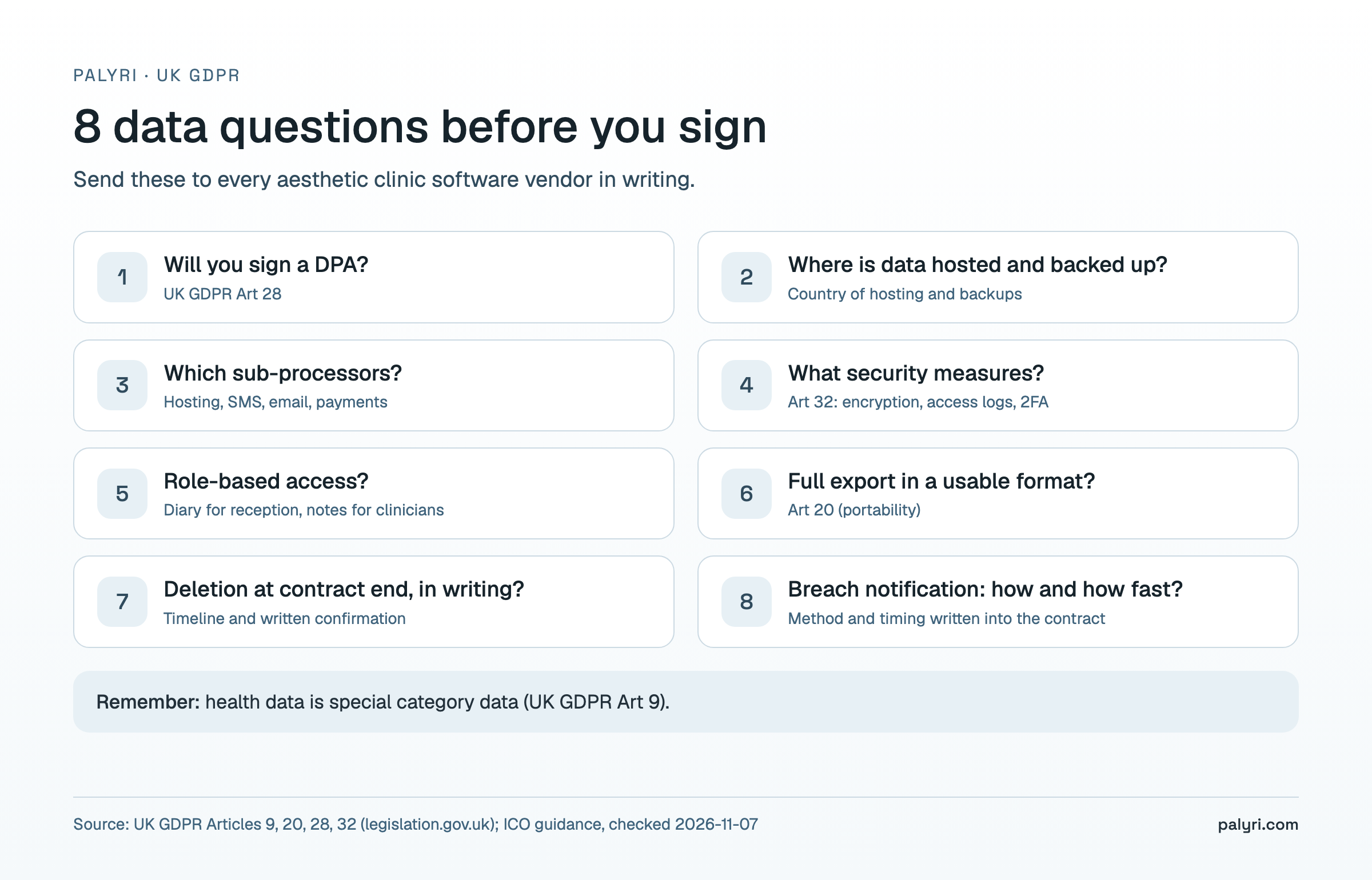
Eight questions to send every vendor in writing before you sign:
- Will you sign a DPA with Article 28 terms, and can I see it before I commit?
- In which country is my data hosted, and where are backups kept?
- Which sub-processors do you use (hosting, SMS, email, payments), and how will you notify me of changes?
- What security measures do you apply, in the sense of Article 32: encryption, access logs, two-factor login?
- Can I set role-based access, so a receptionist sees the diary but not clinical notes?
- Can I export all client data, forms, notes and photos in a usable format, so you can meet clients' portability requests under Article 20 and move systems without losing records?
- What happens to my data at the end of the contract: how long until deletion, and will you confirm it in writing?
- How do you notify me of a personal data breach, and how fast?
Marketing consent is separate from clinical consent; read our guide to marketing consent under GDPR for aesthetics clinics.
CQC, MHRA, JCCP and licensing: records your software must hold
Software does not make a clinic compliant; it makes required records easier to keep and find.
CQC. If your clinic is registered with the CQC, regulation 17 of the 2014 Regulated Activities Regulations requires you to keep an accurate, complete and contemporaneous record for each person, including the care and treatment provided, and to keep it securely. Whether you must register at all depends on the regulated activities you carry out, so check CQC's scope of registration guidance rather than assuming either way.
MHRA and prescribing. Treatments that use prescription-only medicines, such as botulinum toxin, involve a prescriber. Your software should record who prescribed, the product, the batch or lot and the expiry, and should make it easy to follow up a suspected side effect and report it through the MHRA Yellow Card scheme. The MHRA also sets the rules on advertising medicines.
JCCP. The JCCP keeps a register of practitioners and education providers. Useful feature: a practitioner profile storing registration, qualifications and insurance.
Licensing in England. Section 180 of the Health and Care Act 2022 gives the government power to create a licensing scheme for non-surgical cosmetic procedures in England. Choose software that can store practitioner and premises licence details.
ASA and CAP. Built-in SMS and email campaigns fall under the advertising codes. The ASA's beauty and cosmetics advice and its Botox FAQs explain why prescription-only medicines must not be promoted to the public. Pick software that lets you review every template before it is sent. Our guide to ASA and CAP rules for aesthetics marketing covers wording.
How much does aesthetic clinic software cost in the UK? (prices as listed on 2026-11-07)
Only Aesthetic Nurse Software shows a GBP price for every self-serve plan; Pabau shows a Solo price by region, and Phorest and Clinicea publish no GBP price. The table copies each pricing page as listed on 2026-11-07; nothing is estimated.
| Vendor | Published price | Billing unit | What the page lists | Source |
|---|---|---|---|---|
| Aesthetic Nurse Software | Foundation £25 + VAT per month (150 patients); Advanced £50 + VAT per month (unlimited patients); custom quote for 15+ practitioners | Per month, price shown for 1 bookable practitioner | Patient records and documentation, deposits and payments, consent and aftercare forms, before and after photos | ANS pricing |
| Pabau | Solo price shown on the page for your region; other plans via demo request | Per user, per location (Enterprise covers multiple sites); up to 20% off with annual billing | All features on every plan, unlimited patients, shared inbox; four optional add-ons, Engage Plus priced per location plus credits | Pabau pricing |
| Phorest | Quote-only | Starter, Grow, Ultimate, Elite; separate Med Spa Plans tab | Unlimited devices and staff, described as perfect for 3+ staff; local support team on call Mon-Sat | Phorest pricing |
| Clinicea | $59 Starter, $69 Pro, $89 Enterprise (USD; no GBP price published) | Per practitioner, per month; add-ons such as Patient Portal $89 per month per clinic | Customisable EMR, scheduling, financials, inventory; 14-day free trial, no card; free training and support | Clinicea pricing |
Each vendor has a genuine strength. Aesthetic Nurse Software, aimed at 'new and growing' and 'growing and established' aesthetic businesses, publishes GBP prices for both self-serve plans, though Foundation caps you at 150 patients. Pabau includes every feature on every plan, and its plans differ only by number of users (price also depends on region and location, with four optional add-ons). Phorest brings a salon heritage, a branded booking app and a dedicated Med Spa Plans tab. Clinicea lets you trial without a card, but you need to ask for a GBP quote. For Pabau's model in detail, read what Pabau costs a UK aesthetics clinic.
Example: a solo practitioner chooses Aesthetic Nurse Software Advanced for 1 bookable practitioner. Assumption: the clinic is VAT-registered at the standard rate of 20% and adds nothing else. £50 + £10 VAT = £60 per month, or £60 × 12 = £720 per year. A clinic that reclaims VAT nets £600. Repeat this for each vendor's written GBP quote. The ROI calculator for clinic software spend helps you weigh that cost against the bookings it has to support.
Switching software: migration and export questions
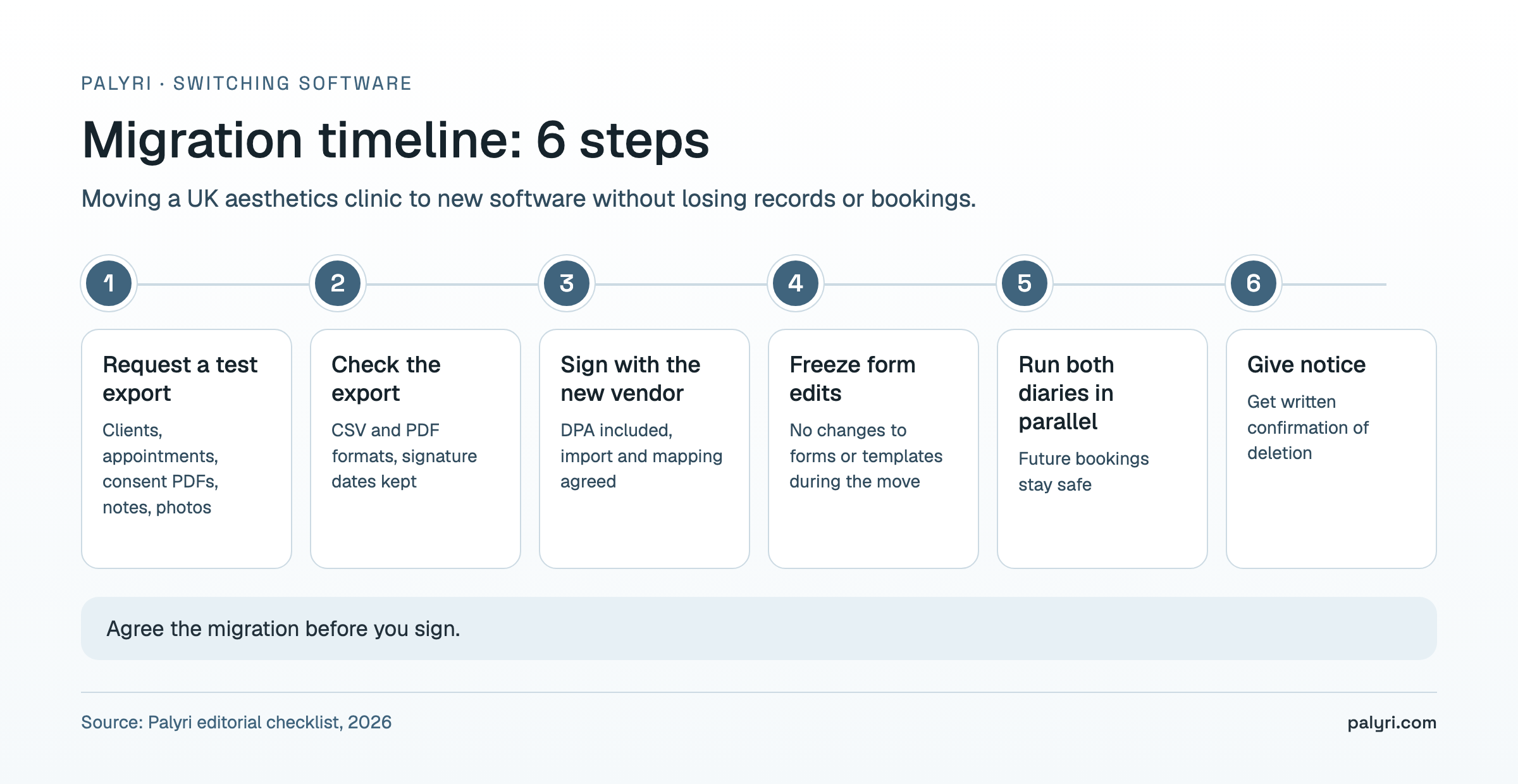
Moving systems risks losing records you must keep, so agree the migration before you sign.
Ask the outgoing vendor:
- Which data can I export: clients, appointments, consent PDFs, notes, photos, invoices?
- In what format (CSV, PDF, original image files), at what fee?
- What is the notice period, and when is my data deleted?
Ask the incoming vendor:
- Who maps fields and forms, and does the import cost extra?
- Can both systems run in parallel so future bookings are not lost?
- Will imported consent forms keep their original signature date?
The comparison of EMR and CRM roles helps you decide which records belong in which system before you move.
Where a CRM fits next to clinic software
Clinic software runs the diary, records and payments. A lead CRM handles the step before: the enquiry from a Meta ad, the follow-up and the booking. Palyri is a CRM and lead pipeline for aesthetics clinics. It takes in Meta lead ads, moves each enquiry through pipeline stages, tracks follow-up and booked visits, can send a Meta Conversions API "Schedule" event when a visit is booked, and lets you set team roles and permissions. It is not an EMR or clinical records system, not a booking engine, and it does not take clinic payments or deposits. You would pair it with one of the systems above for the diary, consent and records, and those vendors are the better fit for that work. See Palyri's CRM for aesthetics clinics and Palyri pricing.
If you are choosing the CRM side, read how to choose a CRM for an aesthetics clinic. For a US-focused view of vendors, see the US med spa software comparison.
| Task | Aesthetic clinic software | Lead CRM |
|---|---|---|
| Capture enquiries from Meta ads and forms | Sometimes, basic | Core job |
| Diary and online booking | Core job | No (Palyri can embed your existing booking tool; it is not a booking engine) |
| Consent forms and treatment records | Core job | No |
| Report which ad produced booked visits | Varies | Core job |
The full 40-point aesthetic clinic software checklist
Print this table and score each shortlisted vendor. A "no" is not a deal-breaker; it is a cost you carry elsewhere.
| ☐ | Check |
|---|---|
| Booking | |
| ☐ | 1. Clients can book online from my website and social profiles |
| ☐ | 2. Deposits are taken in GBP at the time of booking |
| ☐ | 3. Deposit rules can differ by treatment and by new or returning client |
| ☐ | 4. The cancellation policy is shown before payment and applied automatically |
| ☐ | 5. SMS and email reminders include confirm or cancel, with SMS cost stated |
| ☐ | 6. The diary blocks rooms and devices as well as practitioners |
| Consultation and consent | |
| ☐ | 7. Medical history and consent forms are sent before the appointment |
| ☐ | 8. Forms work on a client's phone |
| ☐ | 9. E-signatures carry a timestamp and audit trail |
| ☐ | 10. Consent templates are versioned; signed forms keep the original wording |
| ☐ | 11. An unsigned form flags the appointment |
| ☐ | 12. Aftercare is sent automatically per treatment |
| Records and photos | |
| ☐ | 13. Each visit has its own treatment note |
| ☐ | 14. Notes lock after signing; amendments are shown separately |
| ☐ | 15. Before and after photos are stored on the client card, not a phone |
| ☐ | 16. Photo consent for clinical and marketing use is recorded separately |
| ☐ | 17. Photo comparison works on the tablet used in the treatment room |
| ☐ | 18. Records support CQC regulation 17 if my clinic is registered |
| Medicines and practitioners | |
| ☐ | 19. Prescriber is recorded for every prescription-only medicine treatment |
| ☐ | 20. Product, batch or lot and expiry are mandatory fields for chosen treatments |
| ☐ | 21. Adverse events can be logged and followed up, ready for a Yellow Card report |
| ☐ | 22. Each practitioner profile stores registration, qualifications and insurance |
| ☐ | 23. Practitioner and premises licence details can be stored for England's scheme |
| UK GDPR and security | |
| ☐ | 24. The vendor signs a DPA with Article 28 terms |
| ☐ | 25. Hosting and backup locations are stated in writing |
| ☐ | 26. Sub-processors are listed, with notice of changes |
| ☐ | 27. Two-factor login and access logs are available |
| ☐ | 28. Role-based access hides clinical notes from non-clinical staff |
| ☐ | 29. Breach notification process and timing are stated |
| ☐ | 30. Marketing templates can be reviewed before sending (ASA/CAP, MHRA) |
| Payments in GBP | |
| ☐ | 31. Card payments and invoices are in GBP, with VAT shown |
| ☐ | 32. Courses, packages or memberships can be sold |
| ☐ | 33. Payment processing fees are stated in writing |
| ☐ | 34. Revenue reports split by practitioner and treatment |
| Migration and contract | |
| ☐ | 35. A full export covers clients, appointments, consent PDFs, notes and photos |
| ☐ | 36. Export formats are usable (CSV, PDF, original image files) |
| ☐ | 37. Import from my current system is offered, with cost stated |
| ☐ | 38. A parallel-run period is possible |
| ☐ | 39. Notice period and price-change terms are in the contract |
| ☐ | 40. Deletion at contract end is confirmed in writing |
FAQ
How much does aesthetic clinic software cost in the UK?
As listed on 2026-11-07, Aesthetic Nurse Software publishes the clearest GBP price: £25 + VAT per month on Foundation and £50 + VAT on Advanced, for 1 bookable practitioner. Pabau shows a Solo price by region, Phorest is quote-only and Clinicea lists USD prices only. Add VAT, SMS and add-ons before comparing.
Which software suits a solo aesthetic practitioner?
A solo practitioner needs booking with deposits, consent forms, treatment records with photos and batch fields, at a predictable monthly price. Aesthetic Nurse Software prices per bookable practitioner and publishes a GBP figure, and Pabau has a Solo plan for 1 user. Phorest describes its plans as perfect for 3+ staff, so check the fit.
What is the difference between salon software and aesthetic clinic software?
Salon software is built around the diary, services and retail. Aesthetic clinic software adds consent forms with e-signatures, treatment notes per visit, clinical photos on the client card, and batch and expiry records for injectables. Some vendors bridge both, for example Phorest with separate Salon and Spa Plans and Med Spa Plans. If you offer prescription-only medicine treatments, check the records side first and the diary second.
Can I switch aesthetic clinic software without losing client records?
Yes, if you plan it before signing. Get a test export of clients, appointments, consent PDFs, notes and photos, and check the formats. Ask the new vendor who maps forms, what the import costs and whether signed forms keep their dates. Run both diaries in parallel, then get deletion confirmed in writing. If your clinic is CQC registered, make sure nothing required by regulation 17 is left behind.
Does my software supplier need a data processing agreement under UK GDPR?
Yes. When a vendor stores and processes client data for your clinic, it acts as your processor, and UK GDPR Article 28 requires a written contract with specific terms. Because treatment records and photos are health data, they are special category data under Article 9, so ask about hosting location, sub-processors, security, export and deletion too. Ask to see the DPA before you commit.
Do I need CQC-ready software if my clinic is not CQC registered?
The regulation 17 record duty applies to CQC-registered providers, and whether you must register depends on the regulated activities you carry out, so check CQC's scope guidance. Even unregistered, good records protect you and your clients, UK GDPR still applies, and section 180 of the Health and Care Act 2022 allows a licensing scheme in England. Strong records now avoid a second migration later.
Want to implement this in your clinic?
Book a free Palyri demo. We'll show how it works on your clinic's data.
Book a demoPalyri blog author
Writes for the Palyri blog about getting clients from ads, handling leads and front-desk work in aesthetic clinics and beauty salons.