Med spa scheduling software prevents empty chairs when it does 10 things: books only valid provider, room and time combinations, protects slots with deposits and reminders, refills cancellations automatically and reports where hours are lost. Test all 10 in a live demo with the scorecard below, because a feature list does not show how the system behaves on your hardest service.
This is a selection checklist, not a vendor ranking. For names and prices, see our med spa software comparison. For the launch itself, see the guide to rolling out online booking.
What features should med spa scheduling software have?
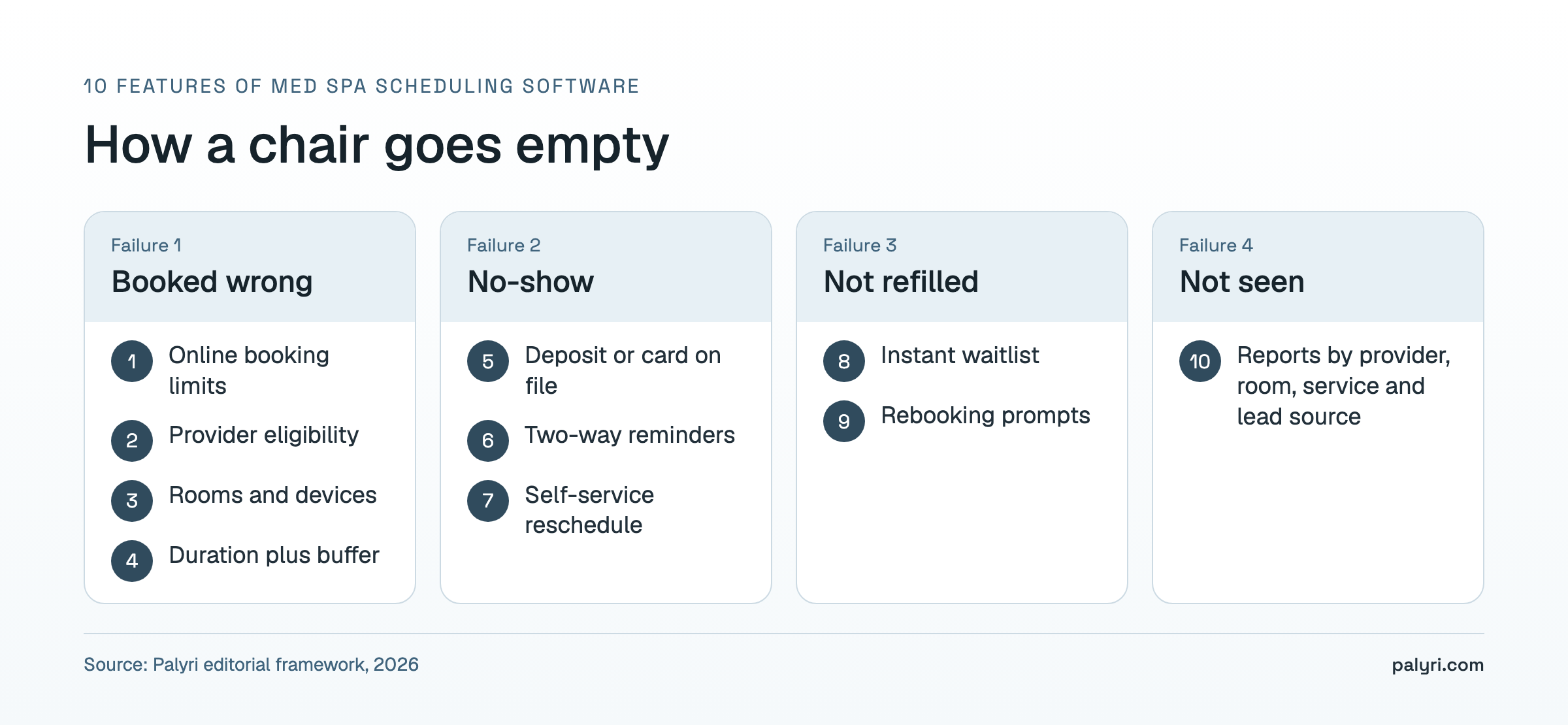
A chair goes empty in one of four ways: the appointment was booked wrong, the patient did not show, nobody refilled the gap, or nobody saw the pattern. Each of the 10 features closes one of those failures, which makes the list easier to use than a long feature grid.
Booked wrong
1. Online booking limited by service and patient type
2. Provider eligibility per service
3. Rooms and devices as bookable resources
4. Duration plus buffer per service
No-show
5. Deposit or card on file by service
6. Two-way automated reminders
7. Self-service reschedule with a cut-off
Not refilled
8. Waitlist with instant notification
9. Rebooking prompts by treatment interval
Not seen
10. Reports by provider, room, service and lead source
Why do generic booking tools leave gaps in a med spa calendar?
Generic tools treat every appointment as a person, a time and a service. A med spa slot also depends on who is approved to perform the service, which room and device it needs, and what has to happen before the patient arrives. SchedulingKit's guide (undated, checked Nov 6, 2026) says: "A general booking tool is the wrong fit for any appointment where you collect health history, consent, or treatment notes." That is a vendor view, but it matches how these bookings fail.
Feature 1: online booking limited by service and patient type
Good medical spa appointment software lets you decide who can book what online. Example: a first-time injectables patient goes to a consult, while a returning patient can book a repeat treatment. Without that limit, the front desk has to move wrong bookings by hand, and the slot you held for a treatment can sit unused.
The same rule should send intake and consent forms at booking and flag any that are unfinished before the visit, so a patient does not arrive and lose the slot to paperwork.
Feature 2: provider eligibility per service
Your medical director sets who may perform each service. The software should enforce that list, not leave it to the memory of whoever answers the phone. Workee, a scheduling vendor, says in its guide (Aug 15, 2026, checked Nov 6, 2026): "The clinic still owns service duration, provider eligibility, resource rules, exception authority, and clinical decisions." The system applies your rules but does not write them.
Feature 3: rooms and devices as bookable resources
Two providers cannot use one laser at the same time, however open their calendars look. A resource-aware system books the provider, the room and the device together and refuses the slot if any one is taken. Workee advises you to confirm room or device inventory and eligibility controls in a demo with your real workflow, which is what the scorecard below does.
Feature 4: duration plus buffer per service
Each service needs its own length and its own gap. Boulevard's guide (Aug 13, 2025, checked Nov 6, 2026) tells buyers to look for buffer time "in between appointments for clean-up and admin". Example: a laser session may need room turnover time that a quick follow-up does not. With one default length for every service, long treatments overrun into the next patient, and short ones leave dead time nobody can sell.
| Feature | What breaks without it |
|---|---|
| 1. Booking limits | A new patient books a treatment that needed a consult first, and the slot is lost when it gets moved |
| 2. Provider eligibility | A service lands with a provider who is not approved for it, so staff rebook by hand |
| 3. Rooms and devices | Two patients are booked on one device, and one of them has to be moved |
| 4. Duration plus buffer | The day runs late, or small gaps add up to hours that cannot be booked |
Which med spa booking software features reduce no-shows?
Three features protect a slot once it is booked: a financial commitment, a reminder the patient can answer, and an easy way to move the appointment early. The evidence is strongest for reminders, and none of it comes from med spas.
Feature 5: deposit or card on file by service
A deposit gives the patient a reason to keep the slot or release it early. It should be set per service, because a long laser block and a quick follow-up do not carry the same risk. We found no independent figure for how much deposits reduce med spa no-shows, so none is quoted here. Amounts and enforcement belong in your no-show fee and cancellation policy; the software only has to apply them.
Feature 6: two-way automated reminders
A 2013 Cochrane review of healthcare appointments found that text reminders improved attendance compared with no reminder: attendance was about 14% higher in relative terms (risk ratio 1.14, 95% confidence interval 1.03 to 1.26, seven studies, 5,841 participants). Texts also had a similar impact to phone call reminders (risk ratio 0.99), which is the case for automating them instead of keeping staff on the phone. The authors still called the evidence "insufficient to conclusively inform policy decisions."
Wording matters too. In a 2020 hospital outpatient study of 161,587 health system members outside the US, the best message had a 14.2% no-show rate against 21.1% for the control. That message used guilt framing, which we do not suggest for a med spa. The useful lesson is that you need software that lets you edit and test the text.
A 2018 review adds that the best timing and frequency still need evaluation, so timing should be configurable per service too. Ready wording is in our appointment reminder text templates.
Automated texts also need a consent record. The FCC says its rules ban autodialed texts to a mobile phone unless the owner gave consent or the message is for an emergency. Under 47 CFR 64.1200(a)(10), a reply such as "stop" or "unsubscribe" revokes consent, and requests must be honored within 10 business days at most. Ask whether the vendor logs consent and opt-outs per patient, and whether its numbers are registered: Twilio's documentation says A2P 10DLC, the US carrier registration for business texting, brings lower message filtering.
Feature 7: self-service reschedule with a cut-off
A patient who can move a visit from a link can give you notice instead of simply not arriving. Boulevard notes that reminders give people "a chance to reschedule while it's still convenient". The cut-off is the second half: inside your policy window, the link should stop working and the deposit rule should apply, per service.
How does a med spa waitlist refill a canceled slot?
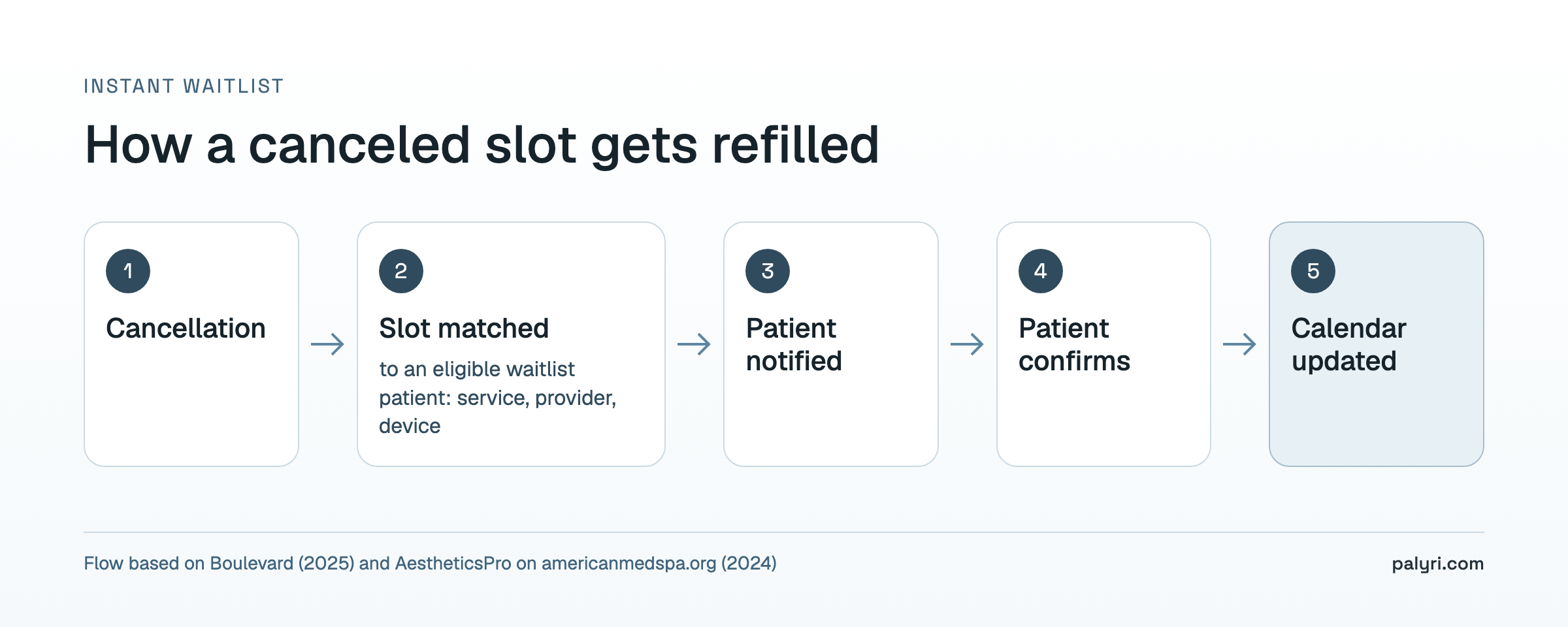
A waitlist refills a slot by matching it to a patient who wants an earlier time, notifying that patient at once and updating the calendar when they confirm. Speed and matching decide whether the slot gets filled.
Feature 8: waitlist with instant notification
AestheticsPro, writing on the American Med Spa Association site (vendor-written, Oct 18, 2024), describes the basic flow: the patient takes a future slot, joins the waitlist for a sooner one, is notified by phone or email, and the schedule is updated on confirmation. Boulevard says software should notify people "right away if their preferred spot opens up" and show staff how many are waiting.
Matching is the part to press on. A freed 60-minute laser slot should only go to patients who need that service, with that provider and device. Otherwise the waitlist creates the booked-wrong failures from features 1 to 4.
Feature 9: rebooking prompts by treatment interval
The easiest slot to fill is one a returning patient is already due for. SchedulingKit's example flow sends a follow-up reminder "in two weeks, then a rebooking prompt a few months later." Your providers should set the interval for each service, and the software should trigger the prompt from the last completed visit.
Waitlist offers and rebooking prompts can count as marketing rather than appointment messages: 47 CFR 64.1200(f)(13) defines telemarketing as a message sent to encourage the purchase of services. Check with your counsel what consent they need before you switch them on.
What scheduling reports show where chairs go empty?
The last feature is the one that shows whether the other nine work. Feature 10 is reporting on utilization, no-shows and cancellations, split finely enough to act on. A single monthly total tells you something is wrong but not where.
Press hardest on lead source, because a booking system only knows which ad produced a patient if something passes that data in. Ask how the source reaches the appointment record. To calculate the metric itself, use our guide to measuring chair utilization.
How much does an empty chair cost? A worked example
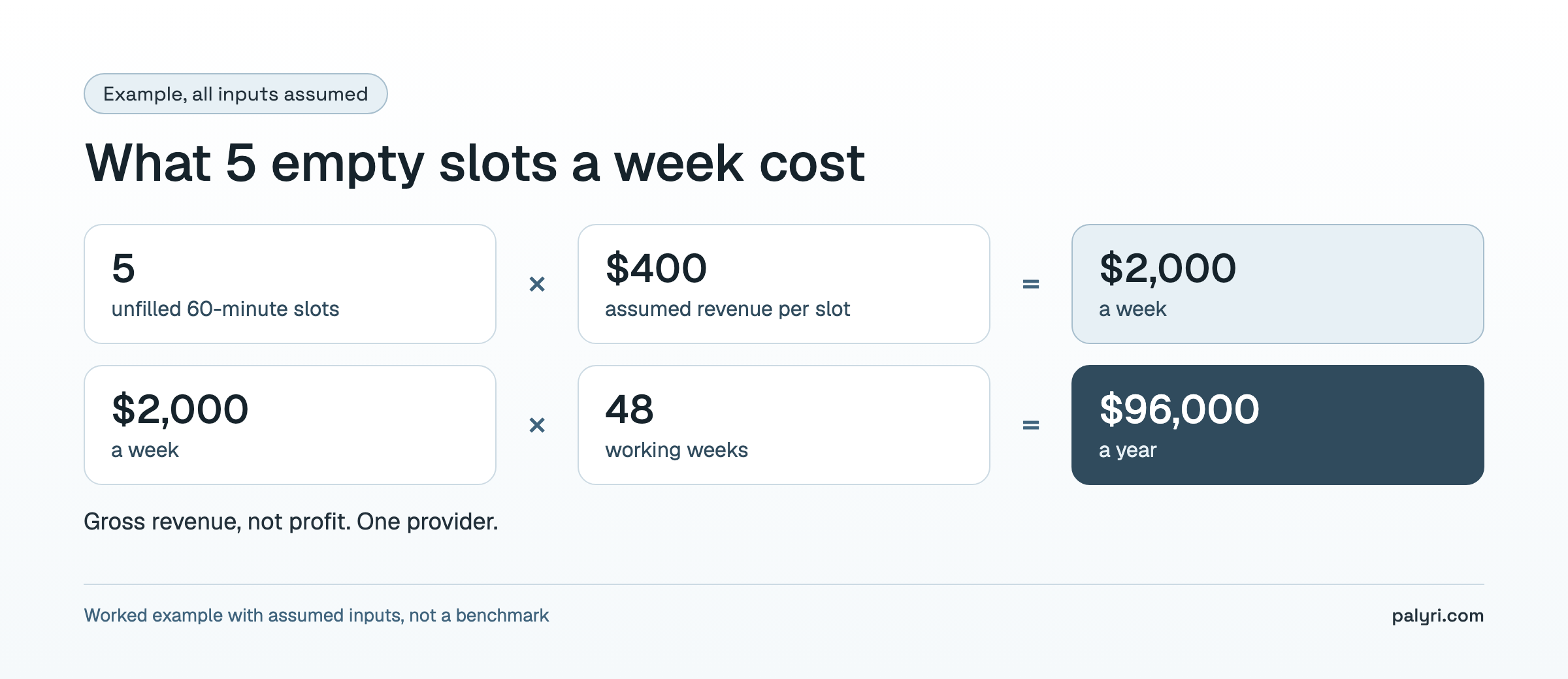
Multiply your unfilled slots by what each one would have brought in. The figures below are an example only: every input is assumed, not a benchmark.
Example: one provider has 5 unfilled 60-minute slots a week, at an assumed $400 of revenue per slot, across 48 working weeks.
- 5 slots x $400 = $2,000 a week
- $2,000 x 48 weeks = $96,000 a year
That $96,000 is lost gross revenue, not lost profit. It leaves out product and provider costs, and no scheduler recovers every slot. Swap in your own numbers, then use the ROI calculator to judge what a fix is worth to your practice.
Med spa scheduling software scorecard: 10 demo tests
Run these tests in a live demo with the vendor sharing the screen. Use your hardest service: the one with the most rules, such as a specific provider, a shared device and a consult first. Copy the table and fill in one per vendor. If the vendor can only describe a behavior instead of showing it, mark it as a fail until proven otherwise.
| Feature | Ask the vendor to show | Pass looks like | Result |
|---|---|---|---|
| 1. Booking limits | Book a treatment online as a new patient when that service requires a consult first | The new patient is routed to the consult; a returning patient can book directly, and forms go out at booking | Pass / Fail |
| 2. Provider eligibility | Book a laser for a provider not approved for it | The system refuses, online and at the front desk | Pass / Fail |
| 3. Rooms and devices | Book two providers on the same device at the same time | The second booking is blocked, and only valid times are offered | Pass / Fail |
| 4. Duration plus buffer | Set a different length and buffer on two services, then book them back to back | The calendar holds the buffer, and online booking does not offer it as free | Pass / Fail |
| 5. Deposits | Change one service's deposit without touching others | Only that service changes, and online booking applies it at once | Pass / Fail |
| 6. Reminders | Reply to a reminder from a real phone, first to confirm, then with "stop" | The appointment status updates, and the opt-out is logged on the patient record | Pass / Fail |
| 7. Reschedule cut-off | Move an appointment from the patient link, then try again inside the cut-off window | The first move works, the second is refused, and the deposit rule applies | Pass / Fail |
| 8. Waitlist | Cancel a slot live: who is notified, and how fast? | Only eligible patients get the offer, without staff action, and the calendar updates on confirmation | Pass / Fail |
| 9. Rebooking | Set an interval on one service and complete a test visit | A prompt is queued for the right date, based on the last completed visit | Pass / Fail |
| 10. Reports | Open utilization by provider and by room or device, no-shows and late cancellations by service, then no-shows and cancellations by lead source | All 5 report cuts appear for a date range you choose, and they can be exported | Pass / Fail |
Count the passes out of 10 and compare vendors side by side. No total is a universal cut-off. Read the fails against your service mix, because a failed device test means little to a practice with no devices. Medspa scheduling rules differ by practice, so run every test on your own services.
Where does a CRM fit next to your scheduling software?
A CRM covers the steps before the booking, and the scheduler covers the slot itself. Palyri sits on the CRM side. It is not scheduling software and has no booking engine, so choose a dedicated scheduler for the 10 features above.
Palyri for aesthetic clinics is a CRM and lead pipeline. It takes in Meta lead ads, runs follow-up automations, records whether each patient showed, and counts no-shows in its reports. It can also send a Meta CAPI "Schedule" event so Meta receives booked consults as an event.
The ad source stays on the lead record in Palyri, so ask your scheduler vendor how an appointment can be matched back to it. If you want that layer as well, see Palyri pricing for what it costs alongside your scheduler.
FAQ
How do I compare med spa scheduling software vendors?
Run the same scorecard on the same hard service with each vendor, so the results can be set side by side. A demo built around the vendor's easiest service tells you little.
Then read the fails against your service mix, because a fail on a treatment you rarely sell matters less than a fail on your main one. For vendor names and prices, see our med spa software comparison.
What is resource-aware scheduling for a med spa?
Resource-aware scheduling means the system books a provider, a room and a device together as one unit. If any of the three is taken, the slot is not offered. For a med spa with one shared laser, this stops two providers from booking the same machine at the same time, even when both calendars look open.
To test it, ask the vendor to double-book a device live in a demo. The second booking should be refused, and only valid times should appear. Then check that the chair utilization report can show the room and the device separately.
How can med spa scheduling software reduce no-shows?
It helps in three ways: deposits or a card on file by service, two-way automated reminders, and self-service rescheduling with a cut-off. Reminders have the best evidence, though from healthcare rather than med spas.
A 2013 Cochrane review found text reminders improved attendance compared with no reminder, about 14% higher in relative terms (risk ratio 1.14), while noting the evidence was still not conclusive. Wording and timing also matter, so choose software that lets you edit both. Start from our reminder text templates and adjust them to your services.
Is a general booking tool enough for a med spa?
It may be enough for simple, non-medical services, but it usually falls short once treatments need a specific provider, room, device, or consent step.
Run four tests on any general tool: can it restrict a service to approved providers, block a double-booked device, hold a different buffer per service, and route new patients to a consult? If it fails those, your front desk will be enforcing the rules by hand. That work is error-prone, and errors turn into lost slots. Our guide to rolling out online booking covers what to set up once you have chosen a tool.
Can med spa scheduling software manage staff schedules?
It can, but depth varies, so check it in a demo rather than assuming. At a minimum, provider working hours should feed directly into what patients can book online, so a day off removes those slots automatically.
Ask the vendor to change one provider's hours live and show that online availability updates at once. Then confirm that the eligibility rules still apply when another provider covers the shift. If they do not, a covered shift can create a booking the covering provider is not approved to perform.
Should a med spa require deposits for online booking?
It depends on the service, and the decision works best per service rather than as one blanket rule. Software should let you require a deposit or card on file for some services, skip it for others, and change each one separately.
We found no independent figure on deposit impact in med spas, so treat vendor percentages with caution. Publish the terms clearly before the patient books. Our no-show fee and cancellation policy guide covers amounts, policy wording and enforcement.
Want to implement this in your clinic?
Book a free Palyri demo. We'll show how it works on your clinic's data.
Book a demoPalyri blog author
Writes for the Palyri blog about getting clients from ads, handling leads and front-desk work in aesthetic clinics and beauty salons.